
Table of Contents:
- Getting Started
- Allez Features
- AI Functionality Overview
- List of Supplier OTAs
- Wide Scale Integration
- Smart Geofencing for TLDs
- Feedback & Tech Support
Stay22 Smart (Allez) Features
- Choose between linking to a destination (city or country) or a specific hotel listing
- Machine-learning algorithms that determine the optimal landing page and online travel agency to maximize conversion rates.
- Automatic Geolocation domain (TLD) handling (for e.g redirecting to .com vs .co.uk, based on the clicking user’s location)
- Automatic language and currency handling
- Unlimited campaign IDs (labels) as you want to track and distinguish bookings
- No adblockers or third party cookies issues
AI Functionality Overview
Based on data collected from our 5 billion annual users, our AI will dynamically direct each user to the online travel agency (OTA) with the highest likelihood of conversion for them.
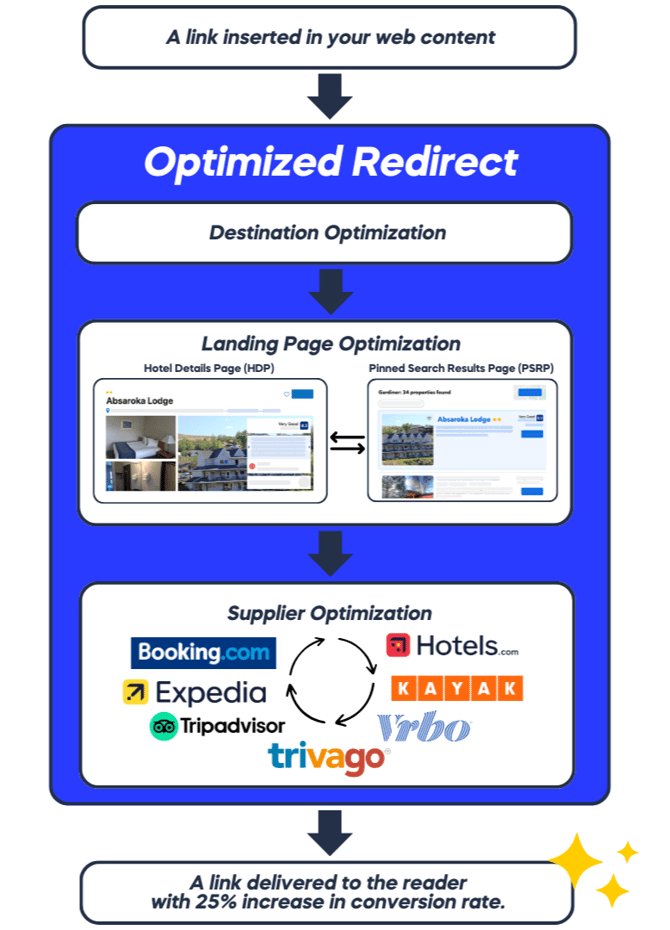
Click here to see the List of Stay22 supplier OTAs
Wide Scale Integration
This is a one-time integration, whether you aim to replace your current hotel links, update accommodation links for specific destinations or locations, or create new links to enhance your content.
Using Allez Links in Apps, Social Media, and Emails
Allez links work the same across all environments — including websites, mobile apps, social media, and emails.
There are no new link types.
You use the same SRP and HDP links shown below, and optionally add one parameter to track where the link is placed.
Add Placement Tracking
Append the following parameter to any Allez URL:
&product_medium={placement}
Allowed values
appssocialemail
Where to Add It
Always append product_medium at the end of the URL, after existing parameters.
A) Linking to a destination with a Search Results Page (SRP)
Allez Links can generate URLs for broad accommodation searches around a destination, address, venue, or GPS coordinates
Website basic URL format for SRP:
https://www.stay22.com/allez/roam?aid={aid}&campaign={optional_label}&address={location}&checkin=YYYY-MM-DD&checkout=YYYY-MM-DD
|
Apps basic URL format for SRP:
https://www.stay22.com/allez/roam?aid={aid}&campaign={optional_label}&address={location}&checkin=YYYY-MM-DD&checkout=YYYY-MM-DD&product_medium={apps}
|
https://www.stay22.com/allez/roam?aid={aid}&campaign={optional_label}&address={location}&checkin=YYYY-MM-DD&checkout=YYYY-MM-DD&product_medium={social}
|
Email basic URL format for SRP:
https://www.stay22.com/allez/roam?aid={aid}&campaign={optional_label}&address={location}&checkin=YYYY-MM-DD&checkout=YYYY-MM-DD&product_medium={email}
|
Examples:
https://www.stay22.com/allez/roam?aid=affiliateid&campaign=test&address=madison%20square%20garden%20new%20york%20usa&checkin=YYYY-MM-DD&checkout=YYYY-MM-DD |
Example with placement tracking (social):
https://www.stay22.com/allez/roam?aid=affiliateid&campaign=test&address=madison%20square%20garden%20new%20york%20usa&checkin=YYYY-MM-DD&checkout=YYYY-MM-DD&product_medium=social |
Using an address: Using GPS coordinates:
https://www.stay22.com/allez/roam?aid=affiliateid&campaign={optional_label}&lat=50.717541&lng=-1.875141&checkin=YYYY-MM-DD&checkout=YYYY-MM-DD
|
Example with placement tracking (apps):
https://www.stay22.com/allez/roam?aid=affiliateid&campaign={optional_label}&lat=50.717541&lng=-1.875141&checkin=YYYY-MM-DD&checkout=YYYY-MM-DD&product_medium=apps
|
Important Notes:
- AID (Affiliate ID): It is crucial to ensure your AID is always included. This should remain constant.
- Campaign ID: It is strongly recommended to use this parameter to define and track different marketing campaigns. There is no limit to the number of campaign IDs you can use, allowing for detailed performance analysis. You can define this parameter as needed. Add multiple campaigns like so:
&campaign=label_1&campaign=label_2&campaign=label_3 - GPS Coordinates: We recommend using latitude and longitude if possible (lat/lng parameters)
- Address Parameter: If GPS coordinates are not possible, please provide as much information as possible of the destination (name of attraction, city, country)
- checkin && checkout: If you are suggesting accommodation for a specific event, it's best to include the dates of the event. To specify dates, use this format:
checkin=YYYY-MM-DD&checkout=YYYY-MM-DD. If there is no specific event, it is best to omit this parameter
B) Linking to hotels via a Hotel Details Page
To direct the user to the detailed page of a listing, simply include the hotel name and location (city and country) in the following format:
Website basic URL format for HDP:
https://www.stay22.com/allez/roam?aid={aid}&campaign={optional_label}&hotelname={hotelname}&address={location}
|
Apps basic URL format for HDP:
https://www.stay22.com/allez/roam?aid={aid}&campaign={optional_label}&hotelname={hotelname}&address={location}&product_medium={apps}
|
Social basic URL format for HDP:
https://www.stay22.com/allez/roam?aid={aid}&campaign={optional_label}&hotelname={hotelname}&address={location}&product_medium={social}
|
Email basic URL format for HDP:
https://www.stay22.com/allez/roam?aid={aid}&campaign={optional_label}&hotelname={hotelname}&address={location}&product_medium={email}
|
Example:
https://www.stay22.com/allez/roam?aid=affiliateid&campaign=test&address=miami%20USA&hotelname=four%20seasons |
Example with placement tracking (social):
https://www.stay22.com/allez/roam?aid=affiliateid&campaign=test&address=miami%20USA&hotelname=four%20seasons&product_medium=social |
Important Notes:
- AID (Affiliate ID): It is crucial to ensure your AID is always included. This should remain constant.
- Campaign ID: It is strongly recommended to use this parameter to define and track different marketing campaigns. There is no limit to the number of campaign IDs you can use, allowing for detailed performance analysis. You can define this parameter as needed. Add multiple campaigns like so:
&campaign=label_1&campaign=label_2&campaign=label_3 - Hotel Name: For hotels with multiple word names (such as hotel names that being with "the"), make sure the names are properly separated with "%20"
- Address Parameter: Use the
&address=parameter to improve search accuracy when using the hotel name. Use city and country
Glossary of parameters
- address: The city and country of the hotel or the destination you are linking to. Using lat/lng is preferred for accuracy.
- latitude and longitude: Recommended for precise location searches. This can replace the address parameter (e.g., lat=50.717541&lng=-1.875141).
Example: https://www.stay22.com/allez/roam?lat=50.717541&lng=-1.875141 - aid: Affiliate ID. If you don’t have one, sign up to the Hub to create one. The format is &aid=affiliateid
- campaign: Use this parameter to track each of your links’ performance (clicks, bookings origin), we strongly recommend adding at least one campaign ID. Add multiple campaigns like so: &campaign=label_1&campaign=label_2&campaign=label_3
- checkin && checkout: Important for events but optional. If there are no specific events or dates, it’s best to omit this parameter. If you need to specify dates, use this format:
checkin=YYYY-MM-DD&checkout=YYYY-MM-DD - activities: To link to an activity, use the following link structure.
To track placement, append
&product_medium=<placement>at the end of your existing Allez URL.Allowed values:
apps,social,email
https://www.stay22.com/allez/getyourguide?aid=affiliateid&campaign=test&address=london%20england
- flights: To link to a flight, use the following link structure.
To track placement, append
&product_medium=<placement>at the end of your existing Allez URL.Allowed values:
apps,social,email
https://www.stay22.com/allez/kayak?aid=affiliateid&campaign=test&address=london%20england
Smart Geofencing for TLDs
We automatically detect the user’s location and redirect them to the correct TLD based on their IP address. This ensures a seamless experience for your users. For example, even if you generate a link to a vrbo.com site, if the user clicking is from Australia, they will be redirected to Stayz.com.au, the Australian brand that is equivalent (with the exact same destination and listing details). This increases both conversion rates and link relevancy to your users.
- Vrbo:
- vrbo.com (US and international, including all languages and currency detections)
- abritel.fr (France)
- stayz.com.au (Australia)
- bookabach.co.nz (New Zealand)
- FeWo-direkt.de (Germany)
- Booking.com:
- As for Booking.com, the brand only supports “booking.com” TLD internationally, but we do automatic language and currency setting for your users.
- Expedia:
- The same smart routing rules applies to Expedia.com. Expedia has over 30 TLD’s from .ca, .co.uk, and etc. You’re in good hands 👍
- Tripadvisor:
- The same smart routing rules applies to Tripadvisor.com. Tripadvisor also has over 30 TLD’s from .fr, .ca, .co.uk, and etc.
- Hotels.com:
- We support redirecting from and to all subdomains for hotels.com, including hoteles.com (LATAM), and hoteis.com (Brazil).
- Kayak:
- We offer support for all KAYAK TLDs, ensuring seamless integration with your platform. Our smart routing rules apply to KAYAK as well, allowing users to be redirected to the appropriate local version of the site, such as kayak.co.jp, kayak.co.uk, and others, based on their location and preferences. The same rules for its sister sites such as Momondo, HotelsCombined, Cheapflights, Swoodoo, checkfelix, and Mundi.
- Trivago (Deprecated):
- The same smart routing rules applies to Trivago.com. Trivago also has over 30 TLD’s from .fr, .ca, .co.uk, and etc.