
We’ve partnered with Tipalti to process partner payouts securely and efficiently.
This article explains how to choose a payment method and update your payout information.
If you need assistance, email support@stay22.com or use the chat bubble in the bottom-right corner of the Hub (weekdays 9am–5pm ET).
Who can update payment information
An Owner or Admin account can:
-
Register on the Settings page and agree to the Terms & Conditions on behalf of the AID
-
Edit the account’s address or payment method information
-
Withdraw funds from the Hub Payments page
Payment Methods
Choose the payment method that fits your setup
Use the option below that best matches your bank account and location. If you already know which payment method you want to use, you can skip to the setup instructions.
Please note that if you are setting up an account based in a country outside of your country of residence, you will need to email support@stay22.com or use the chat bubble in the bottom-right corner of the Hub (weekdays 9am–5pm ET).
-
Direct Deposit / ACH: Best if you have a US-based bank account
-
Local Bank Transfer: Best if you want to receive payments in local currency
-
PayPal: Best if you don’t have a traditional bank account
-
Wire Transfer: Best if local transfer is unavailable, or if you use a local USD account
Direct Deposit / ACH
Best for
Partners with a US-based bank account
Details
-
Available to US-based bank accounts only
-
Includes Wise and Payoneer
Minimum payout amount
US$100
Important
-
If your residential address is in the United States, you can simply enter your bank details in the Hub.
-
If your residential address is outside the United States, additional setup is required. Please contact support@stay22.com for assistance.
Local Bank Transfer
Best for
Partners without a US bank account who want to receive payouts in local currency
Details
-
Cost-effective transfer to a local bank account
-
Uses regional banking networks
-
Available in 50+ countries
Minimum payout amount
US$100
Important
FX fees apply and are visible via the “View tiers” link on the payment method page in the Hub.
PayPal
Best for
Partners who do not have a traditional bank account
Details
-
Funds are sent to your PayPal email address
Minimum payout amount
US$100
Wire Transfer
Best for
-
Partners where local bank transfers are unavailable
-
Partners with a local USD account
Details
-
Direct bank-to-bank transfer
-
Very reliable
-
Usually the most expensive payment method
-
Both sender and receiver may be charged fees
Minimum payout amount
US$500
Setup Instructions
1. Click the Payments tab in the sidebar

2. Click the "update your payment information link"

3. Set up 2-Step Verification
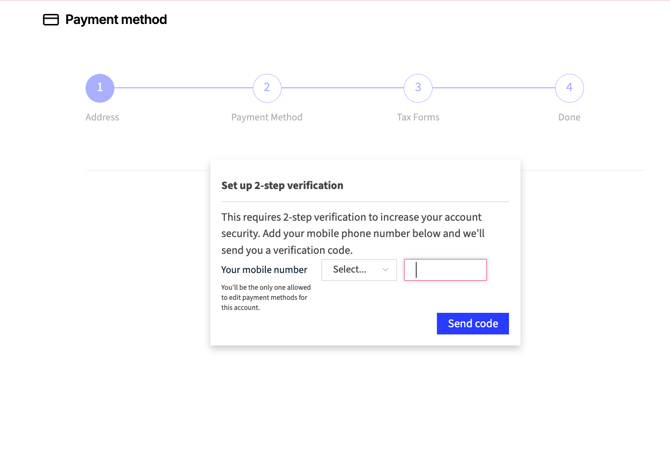

4. Fill out your information

5. Choose your withdrawal type and agree to the Terms of Service

7. Provide your tax information

8. When you see this page you're all set!

9. Go back to the payment page and make a withdrawal when ready
Note: the Withdraw button should now be clickable.
Keep in mind you can only withdraw once every 30 days!