
Table of Contents:
- Overview
- What Spark Does
- How Spark Works
- Benefits
- Eligibility and Requirements
- Controlling Where Spark Runs
- What to Expect After Spark Is Enabled
- Limitations and Important Notes
- Requesting Spark Link Styling Changes
- FAQ
Spark helps partners monetize existing travel content by automatically adding relevant affiliate links where there is clear booking intent.
If you publish travel articles on your website, this page is for you. Spark helps you monetize more of your content. It automatically adds relevant booking links within eligible articles, eliminating the need for manual link placement or changes to your editorial workflow.
Spark is enabled by default for partners already using the Stay22 script. It is designed to complement your current setup, not replace it. It does not overwrite your existing links, rewrite your content, or require a new editorial process.
Overview
Spark for Travel: In-Article Links is for partners who want to monetize accommodation-related intent inside existing travel content. Instead of asking you to manually add affiliate links across old and new articles, Spark identifies relevant opportunities and adds links automatically where they fit naturally.
What Spark Does
Spark can help you:
- Monetize existing travel content without manually updating each page.
- Capture missed accommodation-related opportunities in pages that already show booking intent.
- Add links in a way that matches your site styling and keeps the reading experience intact.
- Generate incremental revenue from content you already own, including older evergreen articles.
How Spark Works
When a page is visited for the first time, Spark reviews the content after the main page content has loaded. It looks for relevant travel-related opportunities and, when appropriate, adds affiliate links automatically. These are Stay22 affiliate links powered by Allez, our smart linking and routing system in the background. Depending on the link and context, Stay22 may also optimize the route, supplier, and landing-page format to improve the chance of conversion.
Spark is designed to be selective. It avoids overlapping with existing links and prioritizes opportunities that are relevant and useful for readers rather than adding links everywhere.
Spark links are added dynamically, inherit your site's existing CSS, are marked as sponsored, and open in a new tab.
Benefits
Partners use Spark because it helps them:
- Monetize content at scale without extra manual work.
- Keep existing content productive over time, including archived and evergreen pages.
- Preserve their editorial workflow and site experience.
- Add monetization only where there is a strong contextual fit.
Eligibility and Requirements
Spark is designed for partners using the Stay22 script on their site. Spark is enabled by default for partners already using that script. You can check your browser console: if you see Sparklink: Enabled in the LetMeAllez output, Spark is active on your site.
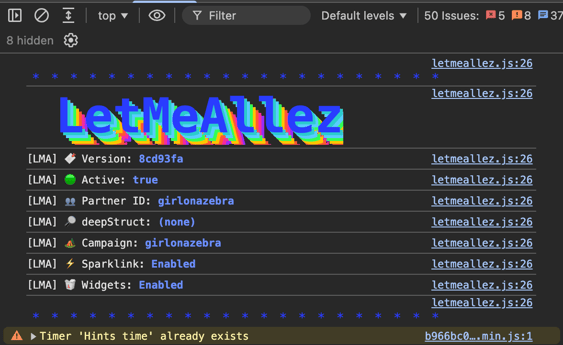
For website article content, Spark currently supports accommodation-related opportunities in travel content. If your content does not contain clear relevant opportunities, Spark will not add links to that page.
Learn which links on your page was added by Spark
Controlling Where Spark Runs
You can manage Spark directly in the Script Builder in your Hub. You can turn Spark on or off across your entire site, or exclude specific pages where you don’t want automatic monetization, such as sponsored posts or brand partnerships.
These settings only affect Spark and won’t change how your other Stay22 products work, even though you'll find them in the Script Builder.
You'll find the controls on the "Create your script page" if you're setting up your script for the first time, or the "Edit your script page" if you already have a script installed. The steps are the same on both pages.
Turn Spark on or off
- In the Hub, open the Script Builder. Select your domain.
- Scroll to the “Spark” section.
- Switch the “Enable Spark” toggle on or off.
- Click “Create script” (new script) or “Save changes” (existing script) in the top right.
Spark is on by default, so you only need to change this setting if you want to turn it off.
Exclude specific pages
You can exclude pages only when Spark is turned on.
- In the “Spark” section, click “Exclude pages” to expand it.
- Enter the page you want to exclude. You can enter the full URL (for example, https://www.mywebsite.com/page) or just the part after your domain (the URL path), starting with “/” (for example, /page).
- Click “Add.”
- Repeat for each page you want to exclude.
- Click “Create script” or “Save changes” to apply your changes.
Each page you add appears in a list below the field, and the label next to “Exclude pages” shows how many pages are excluded.
To remove an exclusion, click the “X” next to the page, then save your changes.
What happens after you exclude a page
Spark stops adding links to that page.
Your page can still earn through links you placed manually and through any other Stay22 products you use there. Excluding a page only turns Spark off for that page
What to Expect After Spark Is Enabled
Once Spark is active, some existing text on eligible pages may become clickable Stay22 affiliate links. Spark doesn’t rewrite your content or add new text; it simply adds links where it identifies relevant opportunities.
When a page is visited for the first time, Spark may need time to analyze the content and cache the results. Because of this, links might not appear immediately for the first visitor. Future visitors can benefit from the cached results.
Keep in mind that Spark won’t add links to every page. The number of links depends on the content and whether Spark finds relevant opportunities that fit naturally within it.
Limitations and Important Notes
- Spark does not replace or edit your existing affiliate links.
- Spark is automated. Individual links are not currently designed to be manually edited one by one.
- Spark is instructed not to add links in the first paragraph of an article.
- Some pages may not receive links if Spark does not detect clear opportunities, and some page structures may limit where links can be inserted.
- If you publish sponsored content or other pages that should not be monetized automatically, you can exclude them using “Exclude pages” in the Spark section of the Script Builder.
Requesting Spark Link Styling Changes
Spark links are generated automatically and cannot be edited one by one. These links are Stay22 affiliate links powered by Allez in the background. However, we can support specific formatting or compliance requirements when needed.
If you need Spark links to follow a specific style, such as adding an asterisk * or adapting link appearance for legal or compliance rules, please contact Support.
Please include:
- The requirement or rule you need followed
- A URL showing your current manual link style
- A URL where Spark links appear, or an example page
- Any specific examples of the desired final format
Our team will review your examples and apply the appropriate configuration where possible.
FAQ
Will Spark change my content?
No. Spark does not rewrite or add text. It only inserts links where it detects a relevant opportunity.
Will Spark overwrite my existing links?
No. Spark is designed to avoid touching links that already exist on the page.
Will Spark slow down my site?
Spark runs after the main page content has loaded, and cached results help reduce repeat processing on later visits.
Is Spark already on for my site? I never turned it on.
If you use the Stay22 script, Spark is turned on by default, so it may already be running on your site even if you never changed a setting. To check, open your script in the Script Builder in the Hub. If Spark is on, you’ll see an “Enabled” tag next to the “Spark” section name. You can also check in your browser: open the Developer Console on one of your pages and look for “Sparklink: Enabled” in the LetMeAllez output.
If I click “Save changes,” do I have to copy new code onto my site, or does it update automatically?
No. Once you click “Save changes,” your Spark settings update automatically. You don’t need to change the Stay22 script on your site.
Will Spark match my website design?
No Spark links on any page that runs that script. Nova and Linkswap keeps working.
Are Spark links SEO-friendly?
Spark links are marked as sponsored and open in a new tab, in line with affiliate-link best practices described in current product documentation.
Can I control or edit individual links?
No. Spark is automated, and individual links are not managed one by one. If you need more control, request page-level exclusions through Support.
Will Spark link to tours and activities?
At the moment Spark only supports accommodations and will not link to tours or activities.
Can exclude specific pages?
Yes. Exclude them in the Hub, and Spark keeps running on your other pages.
When does an exclusion actually take effect?
Your exclusions apply after you click “Save changes” (or “Create script” if you’re setting up your script for the first time).
Spark links may still appear on an excluded page for a short time after you save. This is because pages are cached so they load quickly, and how long it takes depends on that cache.
To check that your exclusion is working, open the page in a private or incognito browser window. This loads a fresh version of the page, without what your browser has saved from earlier visits.
If I exclude /page, does that cover /page/subpage? Can I exclude a whole folder like /sponsored/?
Yes. Excluding a page also excludes every page under it. For example, adding /sponsored/ keeps Spark off /sponsored/brand-a and /sponsored/brand-b. Make sure you don’t exclude more pages than you intend..
Support excluded some pages for me last year. Are they in this list? If the list says “No pages excluded,” did I lose them?
Pages previously excluded for you by Support are still excluded and will appear in this list.
If I turn Spark off and later back on, are my exclusions kept?
You can turn Spark back on at any time using the “Enable Spark” toggle. Your excluded pages are kept and apply again when you turn Spark back on.
How can I tell whether Spark is active?
Spark is designed for partners using the Stay22 script on their site. Spark is enabled by default for partners already using that script. You can check your browser console: if you see in the LetMeAllez output, Spark is active on your site.
Which links on my page were added by Spark?
You can "Inspect" your page by right clicking on your page. Navigate to "Elements" on the "Developer Console" and search hyperlink. For the full steps, see How to Check Which Links on a Page Were Added by Spark.