
Table of Contents:
About the YouTube Integration (Early Access)
Turn your travel videos into revenue opportunities by adding booking links to your video descriptions.
The Stay22 YouTube Integration helps you monetize travel content by identifying destinations mentioned in your videos and generating optimized hotel booking links for your audience.
You stay in full control, nothing is ever added to your videos unless you approve it.
Who this works best for
The integration works best for creators who:
- share travel destinations
- recommend places to stay
- create travel guides or itineraries
Quick Start
Getting started only takes a few steps:
1️⃣ Connect your YouTube channel
2️⃣ Let Stay22 analyze your videos
3️⃣ Review suggested booking links
4️⃣ Publish the updated description to YouTube
Step 1: Connect your YouTube channel
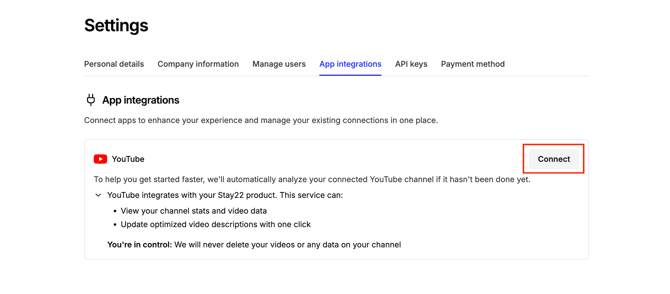
Connecting your channel allows Stay22 to analyze your videos and publish description updates directly to YouTube.
How to connect
-
Log in to the Stay22 Hub
-
Click the user icon in the top right corner of the Hub and select Settings
-
Go to App Integrations
-
Click Connect YouTube Account
-
Authorize access through Google
Make sure you select the Google account associated with the YouTube channel you want to connect.
Once connected, your channel will appear as Connected and your videos will begin analyzing automatically.
Step 2: Let Stay22 analyze your videos
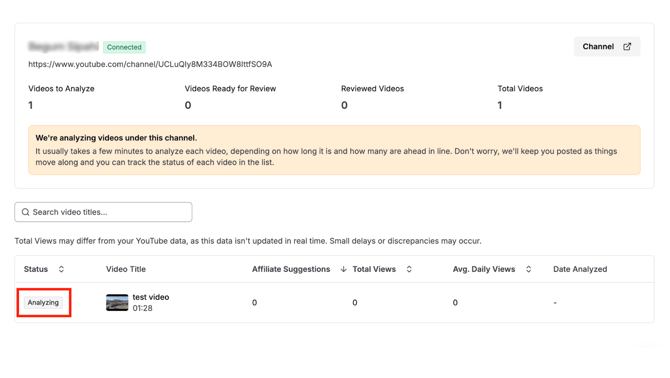
After connecting your channel, Stay22 analyzes your videos to detect travel destinations and booking opportunities.
Each video will appear with a status:
Analyzing: Stay22 is detecting affiliate opportunities in the video.
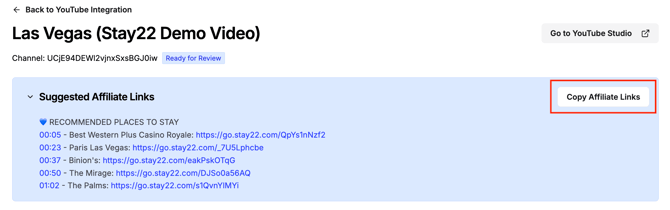
Ready for Review: Affiliate booking links have been generated and are ready to review.
Click any video marked Ready for Review to open the editor.
Step 3: Review and edit your description
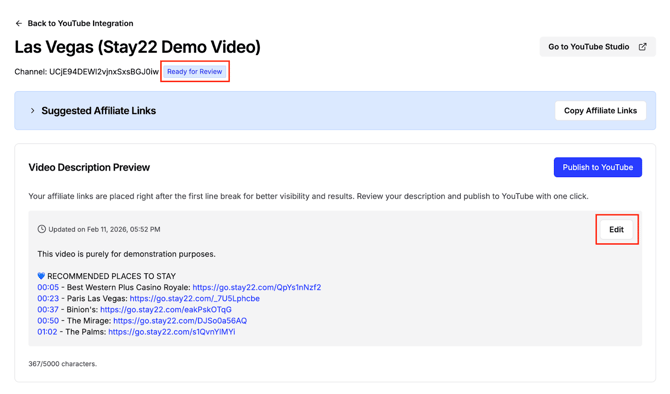
Inside the editor you'll see:
- suggested accommodation affiliate links
- a preview of your updated video description
You can:
- edit the text
- remove links
- customize the description to match your voice
Nothing is published until you click Publish to YouTube.
Step 4: Publish to YouTube
If the Publish to YouTube button doesn’t appear, follow these steps to troubleshoot.
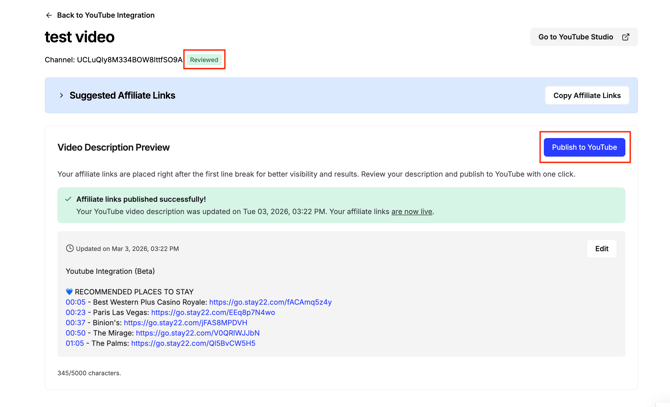
Once you're happy with the description, click:
Publish to YouTube
Your video description will update instantly on YouTube, no copying or pasting required.
Once you publish the updated description to YouTube via "Publish to YouTube" button, the video status will automatically update from "Ready for Review" to "Reviewed".
Note: Stay22 never edits or publishes anything to your videos automatically. Nothing is published until you click Publish to YouTube.
FAQ:
Do I need to copy and paste links into YouTube?
No. Once your YouTube account is connected, you can publish description updates directly from the Stay22 Hub.
There is still an option for you to copy/paste links manually.
How can I check if the new YouTube publishing feature is activated for my account?
Navigate to the YouTube Integration page in your Stay22 Hub. If the feature is enabled, you will see a “Publish to YouTube” button when reviewing a video.
If you don't see "Publish to YouTube”, try refreshing the page first:
-
Mac:
Cmd + Shift + R -
Windows:
Ctrl + Shift + R
If the button still does not appear, try logging out and then logging back in.
Will Stay22 change my videos automatically?
No. Stay22 never changes anything without your approval.
You must click Publish to YouTube before any description update is applied.
Which videos get analyzed?
Stay22 analyzes your 100 most popular public videos based on average daily views.
These typically have the highest potential to generate bookings.
Note: This was already done for Early Access partners once their channel was scanned.
Are all of my videos eligible for analysis?
No. Only videos that meet the following criteria can be analyzed:
- The video is categorized under Travel & Events or People & Blogs on YouTube
- The video length is between 1 and 45 minutes
- The video is publicly available
Do new videos get analyzed automatically?
Not yet. Automatic scanning of newly uploaded videos is coming soon.
Connecting your channel now ensures your account is ready when this feature launches.
Connecting your account doesn’t mean your channel will be re-analyzed.
What if I already updated my descriptions with Stay22 links?
That’s completely fine.
If you publish a description directly from the Hub, the description shown in the editor will replace the existing description on YouTube, so make sure to review it before publishing.
Can I edit the suggested links?
Yes.
You can edit the text, remove links, or customize the description to match your voice.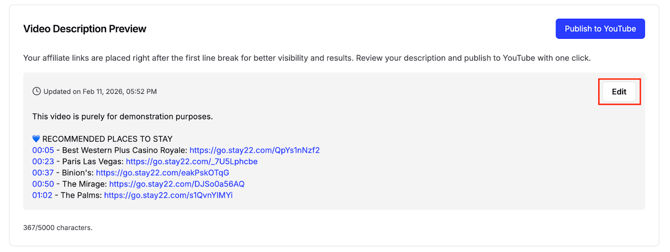
If some videos in my channel haven’t been analyzed yet, will they be automatically analyzed after I connect my account?
No.
If your channel was already analyzed as part of Early Access, connecting your account will not result in another scan of your channel.
Will this affect my YouTube SEO or rankings?
No.
The integration only updates your video description. It does not change your video title, tags, or other metadata.
Can I use this if my channel isn't in English?
Yes.
The integration currently works with videos in:
- English
- Spanish
- French
- Portuguese
You can also edit or translate the description before publishing.
How do I track earnings?
You can track clicks and bookings inside your Stay22 Hub dashboard.
Reporting will continue improving throughout the Early Access program.
Is connecting my YouTube account safe?
Yes.
The integration uses Google's official OAuth authorization system and has gone through YouTube’s comprehensive audit process.
Stay22 only receives permission to:
- read video metadata
- update video descriptions (when you approve)
Your channel and content remain fully under your control.
Does the YouTube integration support exclusions with suppliers?
No, exclusions are not currently supported in the YouTube integration. This is because the tool doesn’t swap or override any existing links in your videos. It simply provides new affiliate links that you can choose to include in your descriptions.
If your account has supplier exclusions set up elsewhere those won't carry over to this integration just yet.
Will I be able to see which video generated a transaction or booking?
Yes. In your Stay22 Hub under the Campaigns column, you'll be able to see the title of the video associated with each transaction. This gives you visibility into how each video is performing. As we continue to improve the integration, we’ll also be enhancing reporting features to provide deeper insights over time.
Need help?
If you have questions or run into issues, reach out to your Partner Success Associate or contact our support team.
Your feedback helps shape the future of the YouTube Integration.